
The Initial Property Walkthrough
The riskiest moment in home watch is the first month with a new client. A stain on the ceiling, a cracked pool tile, a scuffed floor: was that already there, or did it happen on your watch? Without a record, that conversation is your word against theirs, and you will usually eat it.
A walkthrough is how you close that gap. You walk the home once with the owner, photograph what is already damaged or worn, and both of you agree on the starting condition in writing. Everything after that is measured against it.
It does double duty. While you walk, you are also building the checklist that every future visit at that property will use.
Starting a walkthrough
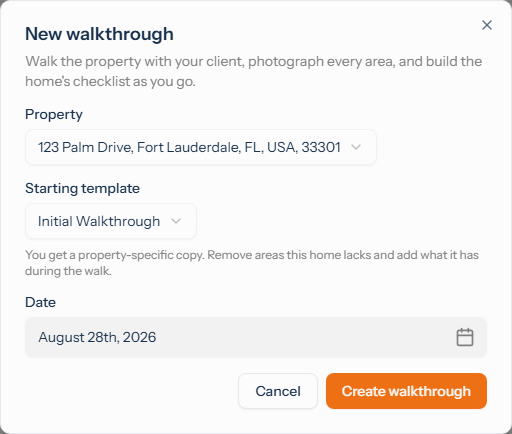
From Visits, click New walkthrough. Pick the property, and the starting template defaults to the Initial Walkthrough skeleton that ships with your account. Set the date and create it.
A walkthrough is not tied to a schedule. It is a one-off visit that sits in your Visits list with a Walkthrough badge, so it never gets confused with a routine inspection.
Building the checklist as you walk
This is what makes a walkthrough different from a normal visit. On a routine inspection the checklist is fixed. On a walkthrough you can add, rename, and remove items while you are standing in the house.
Use it. Every home has things a generic template will not think of: the irrigation timer in the garage, the shutoff behind the hedge, the one window that sticks. Add them as you find them.
For each item, record the condition and photograph anything that is already imperfect. The outcomes are built for this:
- Good condition for anything sound.
- Pre-existing condition for damage or wear that is already there. This is the one that protects you.
- Not applicable for things this home does not have.
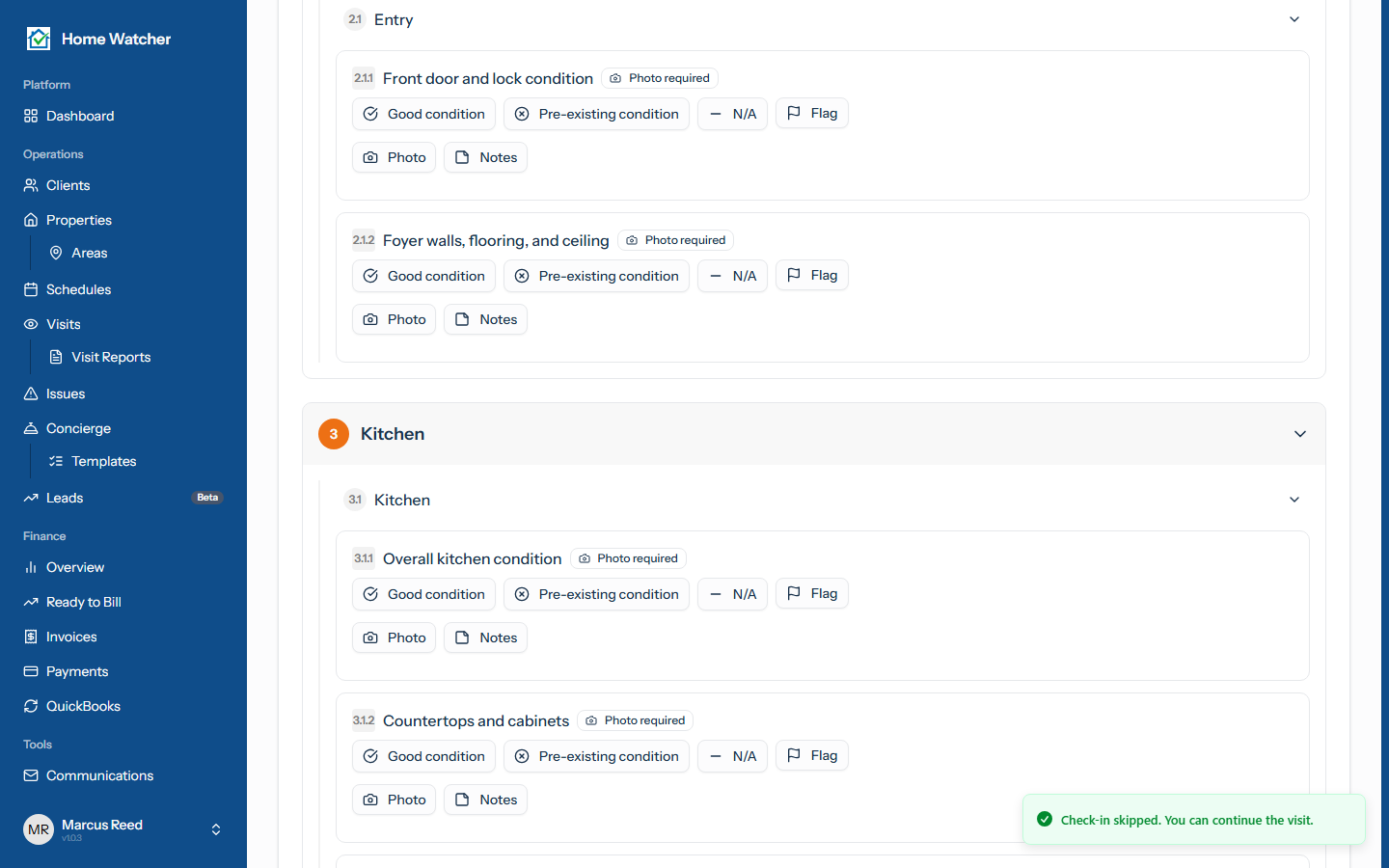
Photograph liberally. A photo taken today costs you nothing and settles an argument six months from now.
Finishing up
When you are done, complete the walkthrough the same way you complete any visit, including the owner's signature. That signature is the point: it is the owner agreeing to the record.
On the completion screen you will see one walkthrough-only option:
Set as this property's home watch checklist. Future visits and schedules for this home will use the checklist you just built.
Leave it checked and the checklist you assembled on site becomes the property's standard inspection. Every visit from then on runs the list you built while looking at the actual house, instead of a generic template. If you would rather decide later, you can do it from the report.
What the client sees
The finished walkthrough becomes a report you can email, and it appears in the client portal under Initial Walkthrough, kept separate from their routine visit history. It stays there as the baseline both of you agreed to.
Walkthroughs are never billed. They will not appear in Ready to Bill and they will never land on an invoice, so documenting a home properly costs you nothing but the hour.
Tips
- Do the walkthrough with the owner present if you can. Agreement in the moment is worth more than a report sent later.
- Be generous with Pre-existing condition. Nobody has ever regretted documenting too much.
- Take the photo even when the damage seems too small to matter. Small things are what get disputed.
- Build the checklist for the house you are in, not the house you imagined. That is the whole advantage of doing it on site.
Once the baseline is set, see completing a visit for the routine inspections that follow, or the client portal guide for what your owners see. To explore everything the app offers, visit the features page or jump into app.homewatchtools.com.
Written by
Mike
Mike is the founder of HomeWatchTools.com, dedicated to building simple, powerful software for the home watch industry.
Keep Reading
Weather in HomeWatchTools
September 27, 2026
National Weather Service forecasts on your upcoming visits, the weather recorded on every completed one, and official warnings for your homes, all shown right where you're already looking.
Home Watch Marketing: A 90-Day Plan to Get Your First 20 Clients
September 17, 2026
A 90-day home watch marketing plan built on the five channels that actually produce clients: referral partners, Google Business Profile, a directory listing, neighborhood presence, and seasonal timing. Includes the free printable marketing kit.
Custom Checklist Outcomes, Required Photos & Auto-Flagging
August 1, 2026
Build your own answer options for checklist items instead of just Pass/Fail, require photos exactly when they matter, and auto-flag problems into Issues automatically. Here's how outcome sets, photo rules, and auto-flagging fit together.