
AI Home Watch Report Summaries Clients Actually Read
Published on: October 13, 2026
An AI report summary is a one-page overview at the front of a home watch report. It tells the homeowner the overall status and what needs attention, in plain language they can read in under a minute. In HomeWatchTools, the status and findings come from your checklist, AI drafts the written summary from your notes seconds after you complete the visit, and you can edit every word of it.
We built it because homeowners asked for it. One of our customers kept hearing the same request from their homeowners: "Give me one page up front that says how the house is doing, then the detail." This article explains what goes on that page, how AI drafts the written summary, what the AI never decides, and what your clients see.
Why Homeowners Skim the Report
An absent homeowner opens your report on a phone, often between other things, and wants one answer before anything else: is my house OK? A thorough report does answer that question, but only after seventeen checklist items, a dozen photos and your notes. Many owners never scroll that far.
A one-page summary flips the order. The answer comes first, the evidence follows, and the owner who wants every detail still has it.
What Goes on the One-Page Summary
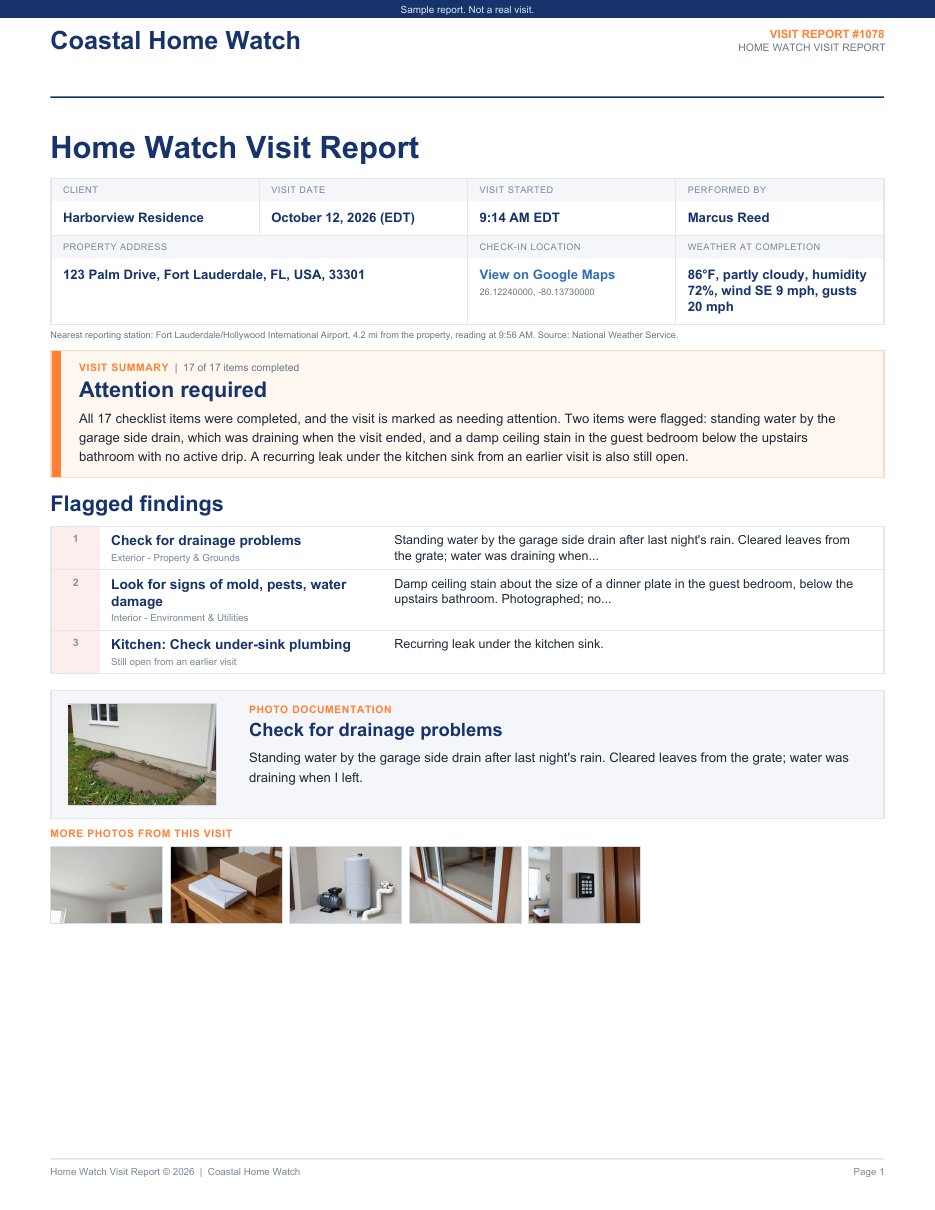
- Your branding: your logo or business name and the report title, under a thin navy band.
- The visit at a glance: the property, the visit date, who did the visit, the check-in time and GPS location, and the weather at completion.
- A headline status: Attention required, Minor items noted or No concerns. It is worked out from the checklist, never guessed: any flagged item or open issue on the property means Attention required.
- The summary paragraph: two to four plain sentences drafted by AI from your notes.
- Flagged findings: numbered, with this visit's flags first and then issues still open from earlier visits, up to six lines.
- A photo card: the cover photo you chose for the first flagged item, plus a row of other photos when there is room.
The full checklist follows, area by area, with PASS, FAIL and N/A badges, your notes and photo thumbnails. Up to four recommended follow-ups appear on page one when there is room, otherwise near the end with your final notes and signature.
How Does AI Write a Home Watch Report Summary?
It reads what you recorded, not the house. Here is what happens when you complete a visit:
- The app works out the headline status, the item counts and the flagged findings from your checklist.
- AI drafts a summary paragraph and up to four recommended follow-ups from your flagged items and their notes, your final notes, and any issues still open on the property. This takes a few seconds.
- The draft appears at the top of the report page, ready to read, edit and send.
Here is the draft the AI wrote for our sample report, word for word:
All 17 checklist items were completed, and the visit is marked as needing attention. Two items were flagged: standing water by the garage side drain, which was draining when the visit ended, and a damp ceiling stain in the guest bedroom below the upstairs bathroom with no active drip. A recurring leak under the kitchen sink from an earlier visit is also still open.
What the AI Decides, and What It Never Decides
| Part of the summary | Decided by |
|---|---|
| Headline status | Your checklist answers, by fixed rules |
| Item counts | Your checklist |
| Flagged findings | Your flags and the issues still open |
| Photos on page one | The cover photo you choose for each item |
| Summary paragraph | Drafted by AI from your notes; you can edit it |
| Recommended follow-up | Drafted by AI from your notes; you can edit it |
The AI cannot change the facts. It does not look at photos, so it can only say what you wrote down. Better notes make better summaries.
How Is This Different From AI Inspection Report Tools?
Many AI inspection report tools write findings for you from voice notes or photos. HomeWatchTools works the other way around: you record the findings, and AI only summarizes them for the homeowner. The facts stay yours, and the summary simply makes them easy to read.
Can I Edit the AI Summary?
Yes. Tap Edit summary to change the wording or the recommendations. Your edits are never replaced unless you choose Draft a new summary and confirm. If you never touch the draft, it goes to your client as written, so read it before you send the report.
What Does the Homeowner See?
Your client sees the same report everywhere: in the PDF, in their client portal and on the page behind a texted report link. On a phone, the summary sits at the top, so the answer is the first thing on the screen.

Standard or Summary + Details?
HomeWatchTools offers two report layouts. Standard is the classic full report. Summary + Details adds the one-page summary up front.
- Choose Summary + Details for owners who live far away, read on their phones, or have told you they just want to know whether anything is wrong.
- Keep Standard for clients who prefer the item-by-item report they already know.
Set a default for your business in Settings > Communications > Report layout, change it for any client on that client's page, or download a single report in the other layout without changing any settings.
Is Client Data Sent to AI?
Only what the summary needs. To draft a summary, HomeWatchTools sends our AI provider, Anthropic, the visit's overall status and item counts, the items you flagged with their notes, your final notes, and the title, description and severity of any issues still open on the property. Client names, property addresses and photos are not sent. You can read the details in our privacy policy.
What Do AI Report Summaries Cost?
Nothing extra. They are part of your HomeWatchTools plan ($49 a month or $529 a year), with nothing to pay per report. See pricing.
How a One-Page Summary Helps Your Business
- Informed clients renew. A clear answer after every visit is the peace of mind they pay for.
- Your rate is easier to justify. A professional summary on top of a documented visit shows the value at a glance. See what to charge for home watch services.
- Fewer "is everything OK?" calls. The answer is already on page one.
- No summary writing at night. The draft is usually ready before you leave the driveway.
- You look like a bigger company. A designed report with a clear summary reads like the work of an established firm.
See It for Yourself
HomeWatchTools is AI-powered home watch reporting software, with GPS-verified visits, checklists, photos, client reports and billing in one app.
Frequently asked questions
Can AI write a home watch report?
AI writes the summary, not the report. Your checklist answers, notes and photos are the report. In HomeWatchTools, AI drafts the written summary and up to four recommended follow-ups from your checklist answers and notes, seconds after you complete the visit, and you can edit every word before you send it.
Is an AI report summary accurate?
The status, counts and flagged findings come straight from your checklist, so they are exact and the AI cannot change them. The paragraph and recommendations are drafted from your notes, so they are only as complete as what you wrote. Read the draft and edit anything you would say differently.
Does the AI look at my photos?
No. It drafts only from the visit's status and counts, your flagged items and their notes, your final notes, and any issues still open on the property. Each item shows its cover photo on the summary page, and you can make any photo the cover, so you decide what your client sees first.
Can I leave the summary off for a client?
Yes. Set that client's report layout to Standard and they get the classic report without the summary page. AI still drafts a summary for every completed visit, so you can switch layouts later. You can also download any single report in the other layout without changing anyone's settings. That is handy when you need a copy for an insurer or a property manager.
Do AI report summaries cost extra?
No. AI report summaries are included in your HomeWatchTools plan, $49 a month or $529 a year, with nothing extra per report. Every completed visit gets a drafted summary, and you choose which clients see the Summary + Details layout.
Written by
Mike
Mike is the founder of HomeWatchTools.com, dedicated to building simple, powerful software for the home watch industry.
Keep Reading
AI Report Summaries and Report Layouts
October 13, 2026
Put a one-page executive summary at the front of every report. Choose a layout, read and edit the AI-drafted summary, and pick the photos your clients see first.
Home Watch for Realtors: Why the Two Businesses Fit So Well
October 3, 2026
Why real estate agents make natural home watch providers, and how closely the two businesses overlap. Covers the benefits of adding home watch, what to clear with your broker first, and how to get started.
Weather in HomeWatchTools
September 27, 2026
National Weather Service forecasts on your upcoming visits, the weather recorded on every completed one, and official warnings for your homes, all shown right where you're already looking.