
New: AI Report Summaries Put the Answer on Page One
Published on: October 13, 2026
A homeowner opening your report on a phone wants one answer first: is my house OK? Until now, that answer sat somewhere inside a full checklist. One of our customers kept hearing the same request from their homeowners: "Give me one page up front, then the detail."
Starting today, every HomeWatchTools report can open with exactly that.
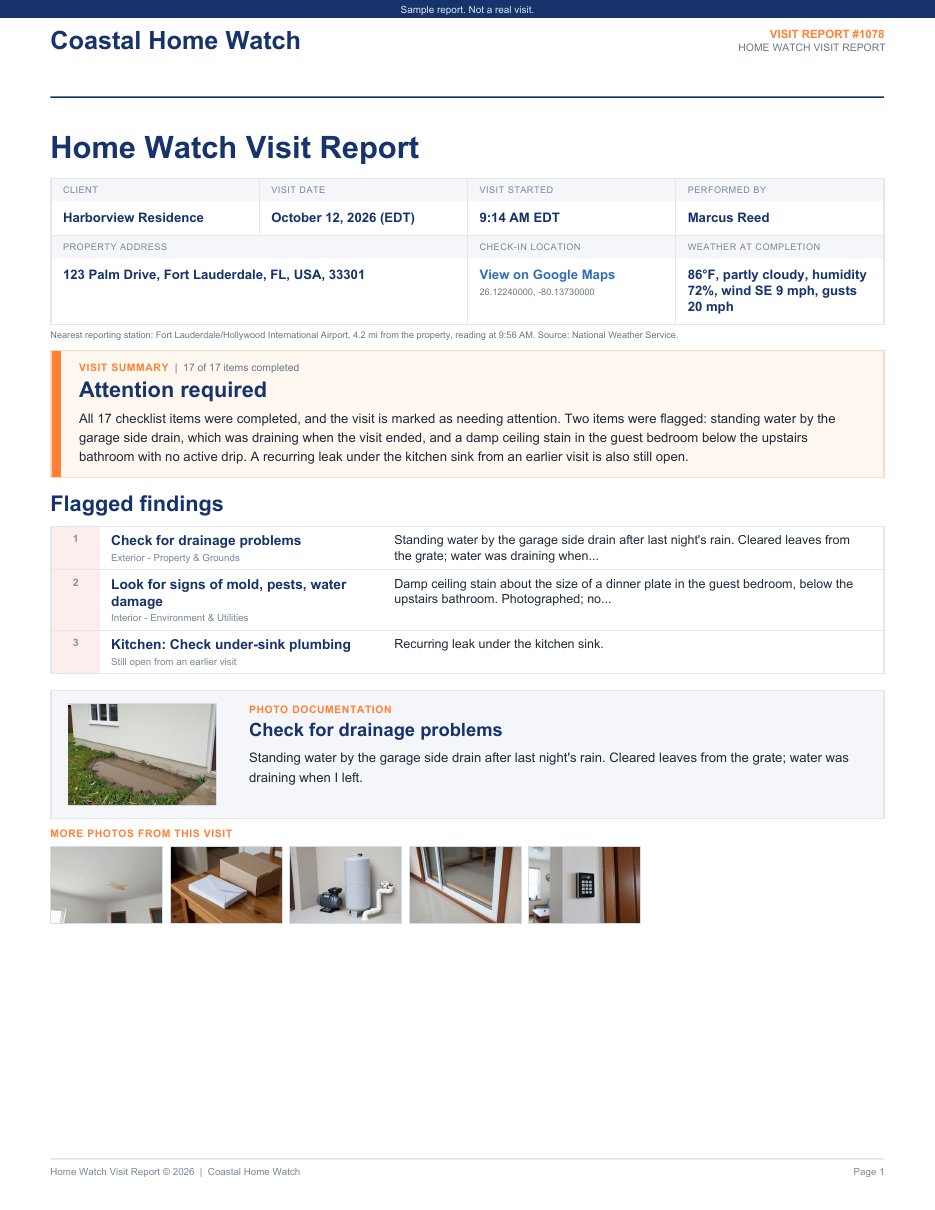
What's on the summary page
- A headline status: Attention required, Minor items noted or No concerns, worked out from your checklist.
- The visit at a glance: property, date, who did the visit, the check-in time and GPS location, and the weather.
- A short written summary of the visit in plain language.
- Numbered flagged findings, including issues still open from earlier visits.
- A photo card showing the cover photo of the first flagged item.
The full checklist follows, area by area. Up to four recommended follow-ups appear on page one when there is room, otherwise near the end.
How the AI summary works
- AI drafts it for you. Seconds after you complete a visit, AI writes the summary paragraph and up to four recommended follow-ups from your checklist answers and notes.
- The facts stay yours. The headline status, the counts and the flagged findings come straight from your checklist. The AI cannot change them, and it does not look at photos.
- You can edit every word. Tap Edit summary to change anything. Your edits are never replaced unless you ask for a new draft.
- One report everywhere. Your client sees the same layout in the PDF, in the client portal and behind a texted report link.
AI report summaries are included in your plan at no extra cost.
Your choice of layout
Reports now come in two layouts. Standard is the full report you know. Summary + Details adds the one-page summary up front. Set your default in Settings > Communications > Report layout, choose a different layout for any client on that client's page, or download a single report in the other layout without changing anything.
Why it matters
- Clients read it. The answer they care about is the first thing on the page.
- Fewer worried calls. "Is everything OK?" is already answered.
- Your evenings back. The summary is usually drafted before you leave the driveway.
See one now
Download a sample Summary + Details report (PDF), read how AI report summaries work, or follow the step-by-step setup guide.
Not a customer yet? See everything the Home Watcher app does or check pricing.
Written by
Mike
Mike is the founder of HomeWatchTools.com, dedicated to building simple, powerful software for the home watch industry.
Keep Reading
New: See Exactly What Your Clients Will Receive, Before Your First Visit
October 8, 2026
Preview a complete, realistic sample report for any checklist you build, with your logo, your checklist and your answer options. Plus a ready-made sample you can open on day one.
New: 'Powered by HomeWatchTools' Badges for Your Website
June 11, 2026
Show clients your home watch business runs on professional software. Our new media kit has free website badges, embed snippets, social images, and brand assets, ready to copy-paste.
An Honest Update from HomeWatchTools: Building Trust, Together
November 16, 2025
A note from our founder on our recent progress, a major milestone in trust, and an invitation to shape the future of the Home Watcher App together.