
New: See Exactly What Your Clients Will Receive, Before Your First Visit
Published on: October 8, 2026
When you start a home watch business, or switch software, there is one question that matters more than any feature list: what will my clients actually see?
Until now, the only way to find out was to complete a real visit. You had to build your checklist, set up a client and a property, walk the house, and finish the report before you could judge whether it looked the way you wanted.
Starting today, you can see the finished product first.
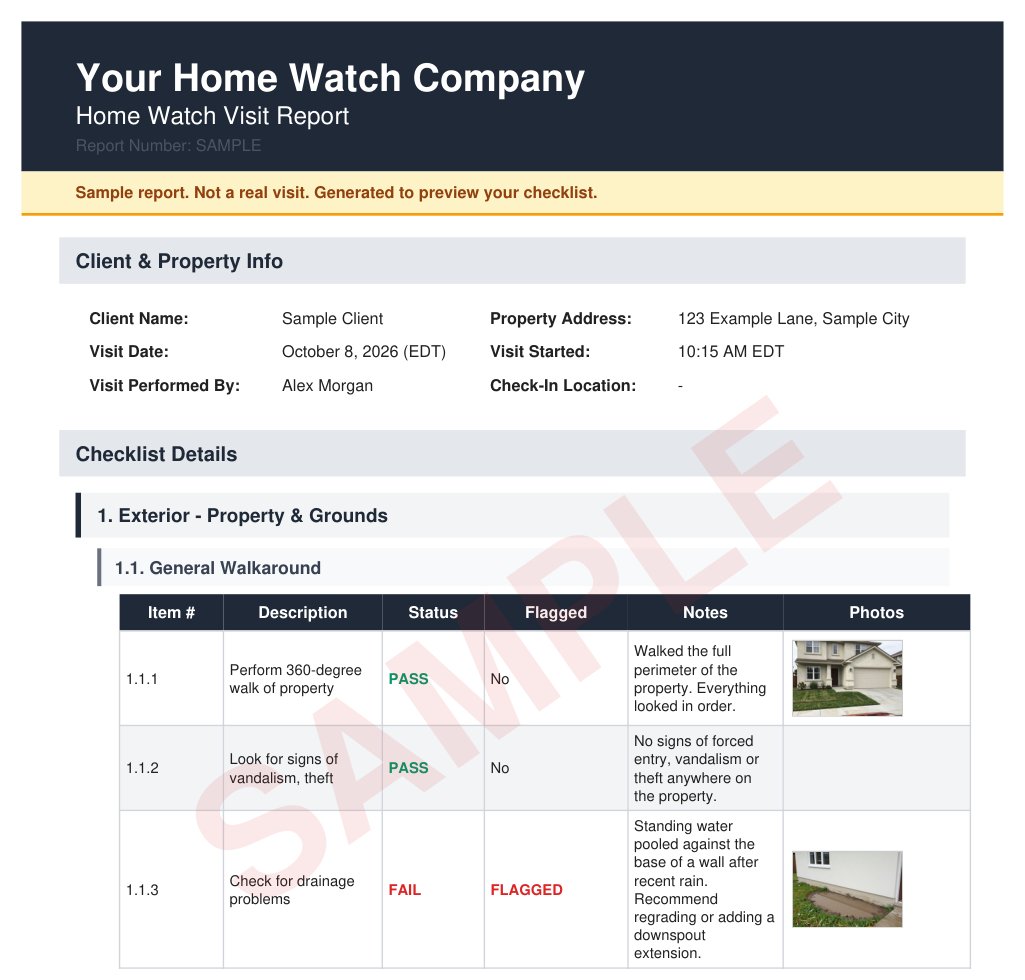
Preview any checklist as a finished report
Open your Checklists page, choose Preview sample report from any checklist's menu, and in about half a minute you get a complete report built from that exact checklist:
- Your business name and logo across the top, just like your real reports.
- Every item on your checklist, in your order, using the answer options you set up, whether that's Pass / Fail, Yes / No, or your own custom options.
- A realistic note on every item, written the way a professional home watcher reports to an absent homeowner.
- Photos on the items that need them, so you can see how pictures sit alongside each finding.
- Two or three realistic issues, such as standing water by the foundation or a slow drip under the kitchen sink, so you can see exactly how problems are flagged and called out for your client.
- A closing thank-you note and a signature, the way a finished visit wraps up.
Change your checklist, and the next preview reflects your changes. Open it again without changes, and it appears instantly.
Clearly marked, never sent
Every page carries a large SAMPLE watermark and a banner that reads "Sample report. Not a real visit." The sample uses a made-up client and address, and it is never emailed, never added to your client portal, and never mixed in with your real reports. Nothing in your account changes when you preview one, so you can try it on every checklist you have.
A ready-made sample from day one
Haven't built a checklist yet? Your Reports page now includes a sample report built from our standard home watch checklist, with your own business name and logo. It's the fastest way to see what a HomeWatchTools report looks like the moment you sign up.
Why it matters
- Build better checklists. Seeing your checklist as a client-ready report shows you right away which items are too vague, which need photos, and which you can combine.
- Win clients with confidence. Show a prospective client the kind of report they'll get after every visit, before you've visited their home.
- Train your team. Give new home watchers a concrete example of what good notes and photos look like.
See one now
Curious what it looks like? Download a sample home watch report (PDF) to see a full visit report, flagged issues and photos included.
Already a customer? Head to your Checklists page and choose Preview sample report on any checklist.
Not a customer yet? See everything the Home Watcher app does or check pricing.
Written by
Mike
Mike is the founder of HomeWatchTools.com, dedicated to building simple, powerful software for the home watch industry.
Keep Reading
New: 'Powered by HomeWatchTools' Badges for Your Website
June 11, 2026
Show clients your home watch business runs on professional software. Our new media kit has free website badges, embed snippets, social images, and brand assets — ready to copy-paste.
An Honest Update from HomeWatchTools: Building Trust, Together
November 16, 2025
A note from our founder on our recent progress, a major milestone in trust, and an invitation to shape the future of the Home Watcher App together.
New Feature Release: Email Home Watch Reports Directly from the App
September 5, 2025
You can now email home watch reports directly from the HomeWatcher App, streamlining client communication and making it easier than ever to share important updates.